OK, you have a number of problems here, all of which are correctable. From my point of view google drive is a PITA as I needed to re select the drive for each svg (I initially missed the .fzpz file!) If would be much preferred if you had just uploaded the .fzpz file (which upload will accept, upload is 7th icon from the left in the reply menu.) That said, on to the problems. The main one is that your fzpz file is in the wrong format and thus won’t load as the format is unknown as it doesn’t have a part.part_name.fzp file.
24V_SMD2835_LED_Strip.fzpz
extracts to (when unzipped)
24V_SMD2835_LED_Strip.fzp
24V_SMD2835_LED_Strip_breadboard.svg
24V_SMD2835_LED_Strip_icon.svg
24V_SMD2835_LED_Strip_pcb.svg
24V_SMD2835_LED_Strip_schematic.svg
when it needs to be
part.24V_SMD2835_LED_Strip_1.fzp
svg.breadboard.24V_SMD2835_LED_Strip_1_breadboard.svg
svg.pcb,24V_SMD2835_LED_Strip_1_pcb.svg
svg.schematic.24V_SMD2835_LED_Strip_1_schematic.svg
(icon will be replaced in the .fzp file by the breadboard svg!)
svg.icon.24V_SMD2835_LED_Strip_icon.svg and be removed and replaced with svg.breadboiard.24V_SMD2835_LED_Strip_1_breadboard.svg in the .fzp file.
As a side note everything I am doing here should be in the part making tutorial here
so make those changes then furn FritzingCheckPart.py to check the part and report errors.
run FritzingCheckPart
$ FritzingCheckPartw.py part.24V_SMD2835_LED_Strip.fzp
**** Starting to process file Startup, no file yet
**** Starting to process file part.24V_SMD2835_LED_Strip.fzp
File
‘part.24V_SMD2835_LED_Strip.fzp.bak’
This is a through hole part as both copper0 and copper1 views are present.
If you wanted a smd part remove the copper0 definition from line 52
Warning 3: File
‘part.24V_SMD2835_LED_Strip.fzp.bak’
At line 2
ModuleId ‘24V_SMD2835_LED_strip’
Doesn’t match filename
‘24V_SMD2835_LED_Strip’
Warning 6: File
‘part.24V_SMD2835_LED_Strip.fzp.bak’
At line 2
ReferenceFile name
‘WS2812_RGB_LED_strip.fzp’
Doesn’t match fzp filename
‘24V_SMD2835_LED_Strip.fzp’
Warning 7: File
‘part.24V_SMD2835_LED_Strip.fzp.bak’
At line 2
No Fritzing version in fzp file
Error 15: Can not rename
‘svg.24V_SMD2835_LED_Strip_icon.svg’
to
‘svg.24V_SMD2835_LED_Strip_icon.svg.bak’
‘svg.24V_SMD2835_LED_Strip_icon.svg’
No such file or directory (2)
Error 20: File
‘svg.24V_SMD2835_LED_Strip_icon.svg’
During processing svgs from fzp, svg file doesn’t exist
Error 15: Can not rename
‘svg.24V_SMD2835_LED_Strip_breadboard.svg’
to
‘svg.24V_SMD2835_LED_Strip_breadboard.svg.bak’
‘svg.24V_SMD2835_LED_Strip_breadboard.svg’
No such file or directory (2)
Error 20: File
‘svg.24V_SMD2835_LED_Strip_breadboard.svg’
During processing svgs from fzp, svg file doesn’t exist
Error 15: Can not rename
‘svg.24V_SMD2835_LED_Strip_schematic.svg’
to
‘svg.24V_SMD2835_LED_Strip_schematic.svg.bak’
‘svg.24V_SMD2835_LED_Strip_schematic.svg’
No such file or directory (2)
Error 20: File
‘svg.24V_SMD2835_LED_Strip_schematic.svg’
During processing svgs from fzp, svg file doesn’t exist
Error 15: Can not rename
‘svg.24V_SMD2835_LED_Strip_pcb.svg’
to
‘svg.24V_SMD2835_LED_Strip_pcb.svg.bak’
‘svg.24V_SMD2835_LED_Strip_pcb.svg’
No such file or directory (2)
Error 20: File
‘svg.24V_SMD2835_LED_Strip_pcb.svg’
During processing svgs from fzp, svg file doesn’t exist
This is because the file names in the .fzp file are incorrectly formatted as well
this (in the .fzp file)
  <views>
    <iconView>
      <layers image="24V_SMD2835_LED_Strip_icon.svg">
        <layer layerId="icon"/>
      </layers>
    </iconView>
    <breadboardView>
      <layers image="24V_SMD2835_LED_Strip_breadboard.svg">
        <layer layerId="breadboard"/>
      </layers>
    </breadboardView>
    <schematicView>
      <layers image="24V_SMD2835_LED_Strip_schematic.svg">
        <layer layerId="schematic"/>
      </layers>
    </schematicView>
    <pcbView>
      <layers image="24V_SMD2835_LED_Strip_pcb.svg">
        <layer layerId="silkscreen"/>
        <layer layerId="copper0"/>
        <layer layerId="copper1"/>
      </layers>
    </pcbView>
  </views>
needs to change to this
  <views>
    <iconView>
      <layers image="breadboard/24V_SMD2835_LED_Strip_1_breadboard.svg">
        <layer layerId="icon"/>
      </layers>
    </iconView>
    <breadboardView>
      <layers image="breadboard/24V_SMD2835_LED_Strip_1_breadboard.svg">
        <layer layerId="breadboard"/>
      </layers>
    </breadboardView>
    <schematicView>
      <layers image="schematic/24V_SMD2835_LED_Strip_1_schematic.svg">
        <layer layerId="schematic"/>
      </layers>
    </schematicView>
    <pcbView>
      <layers image="pcb/24V_SMD2835_LED_Strip_1_pcb.svg">
        <layer layerId="silkscreen"/>
        <layer layerId="copper0"/>
        <layer layerId="copper1"/>
      </layers>
    </pcbView>
  </views>
I have added the necessary prefixes for the svg directories and a _1 version number to each file (which is optional but desirable for version control.) Which also reuses the breadboard svg as the icon svg and saves some file space. That done we now run FritzingCheckPart again which still has some complaints to fix up.
$ FritzingCheckPartw.py part.24V_SMD2835_LED_Strip_1.fzp
**** Starting to process file Startup, no file yet
**** Starting to process file part.24V_SMD2835_LED_Strip_1.fzp
**** Starting to process file svg.breadboard.24V_SMD2835_LED_Strip_1_breadboard.svg.bak
**** Starting to process file svg.schematic.24V_SMD2835_LED_Strip_1_schematic.svg.bak
**** Starting to process file svg.pcb.24V_SMD2835_LED_Strip_1_pcb.svg.bak
File
‘part.24V_SMD2835_LED_Strip_1.fzp.bak’
This is a through hole part as both copper0 and copper1 views are present.
If you wanted a smd part remove the copper0 definition from line 52
Modified 4: File
‘svg.schematic.24V_SMD2835_LED_Strip_1_schematic.svg.bak’
At line 48
ReferenceFile
‘AMS1117_module_schematic_c.svg’
doesn’t match input file
‘24V_SMD2835_LED_Strip_1_schematic.svg’
Corrected
Modified 1: File
‘svg.schematic.24V_SMD2835_LED_Strip_1_schematic.svg.bak’
At line 190
Removed px from font-size leaving 4.66667
Modified 1: File
‘svg.schematic.24V_SMD2835_LED_Strip_1_schematic.svg.bak’
At line 198
Removed px from font-size leaving 4.66667
Modified 1: File
‘svg.schematic.24V_SMD2835_LED_Strip_1_schematic.svg.bak’
At line 206
Removed px from font-size leaving 6
Modified 1: File
‘svg.schematic.24V_SMD2835_LED_Strip_1_schematic.svg.bak’
At line 220
Removed px from font-size leaving 4.66667
Modified 1: File
‘svg.schematic.24V_SMD2835_LED_Strip_1_schematic.svg.bak’
At line 227
Removed px from font-size leaving 4.66667
Warning 3: File
‘part.24V_SMD2835_LED_Strip_1.fzp.bak’
At line 2
ModuleId ‘24V_SMD2835_LED_strip_1’
Doesn’t match filename
‘24V_SMD2835_LED_Strip_1’
Warning 6: File
‘part.24V_SMD2835_LED_Strip_1.fzp.bak’
At line 2
ReferenceFile name
‘WS2812_RGB_LED_strip.fzp’
Doesn’t match fzp filename
‘24V_SMD2835_LED_Strip_1.fzp’
Warning 7: File
‘part.24V_SMD2835_LED_Strip_1.fzp.bak’
At line 2
No Fritzing version in fzp file
Warning 19: File
‘svg.breadboard.24V_SMD2835_LED_Strip_1_breadboard.svg.bak’
At line 21
Height 48.127998 is defined in px
in or mm is a better option (px can cause scaling problems!)
Warning 19: File
‘svg.breadboard.24V_SMD2835_LED_Strip_1_breadboard.svg.bak’
At line 21
Width 132.63219 is defined in px
in or mm is a better option (px can cause scaling problems!)
Warning 32: File
‘svg.schematic.24V_SMD2835_LED_Strip_1_schematic.svg.bak’
At line 22
Scale is not the desirable 1/1000 ratio from width/height to
viewBox width/height.
Warning 19: File
‘svg.pcb.24V_SMD2835_LED_Strip_1_pcb.svg.bak’
At line 21
Height 48.127998 is defined in px
in or mm is a better option (px can cause scaling problems!)
Warning 19: File
‘svg.pcb.24V_SMD2835_LED_Strip_1_pcb.svg.bak’
At line 21
Width 132.63219 is defined in px
in or mm is a better option (px can cause scaling problems!)
Error 18: File
‘part.24V_SMD2835_LED_Strip_1.fzp.bak’
Connector connector0terminal is in the fzp file but not the svg file. (typo?)
svg svg.breadboard.24V_SMD2835_LED_Strip_1_breadboard.svg.bak
Error 18: File
‘part.24V_SMD2835_LED_Strip_1.fzp.bak’
Connector connector1terminal is in the fzp file but not the svg file. (typo?)
svg svg.breadboard.24V_SMD2835_LED_Strip_1_breadboard.svg.bak
Error 18: File
‘part.24V_SMD2835_LED_Strip_1.fzp.bak’
Connector connector2terminal is in the fzp file but not the svg file. (typo?)
svg svg.breadboard.24V_SMD2835_LED_Strip_1_breadboard.svg.bak
Error 18: File
‘part.24V_SMD2835_LED_Strip_1.fzp.bak’
Connector connector3terminal is in the fzp file but not the svg file. (typo?)
svg svg.breadboard.24V_SMD2835_LED_Strip_1_breadboard.svg.bak
The missing terminalIds in breadboard won’t cause a problem (but removing them from the fzp file would be a good practice.)
The dimensions in px will likely cause scaling problems if you ware editing the svgs with a current Inkscape version. At present Inkscape is using 96DPI, Friting (given dimensions in px) will guess at either 72DPI or 90DPI (used by older Inkscape versions.) Either guess will scale the svg wrong and make the size of the part incorrect in Fritzing. To fiz that you need to dimension the part in mm or in rather than px like this:
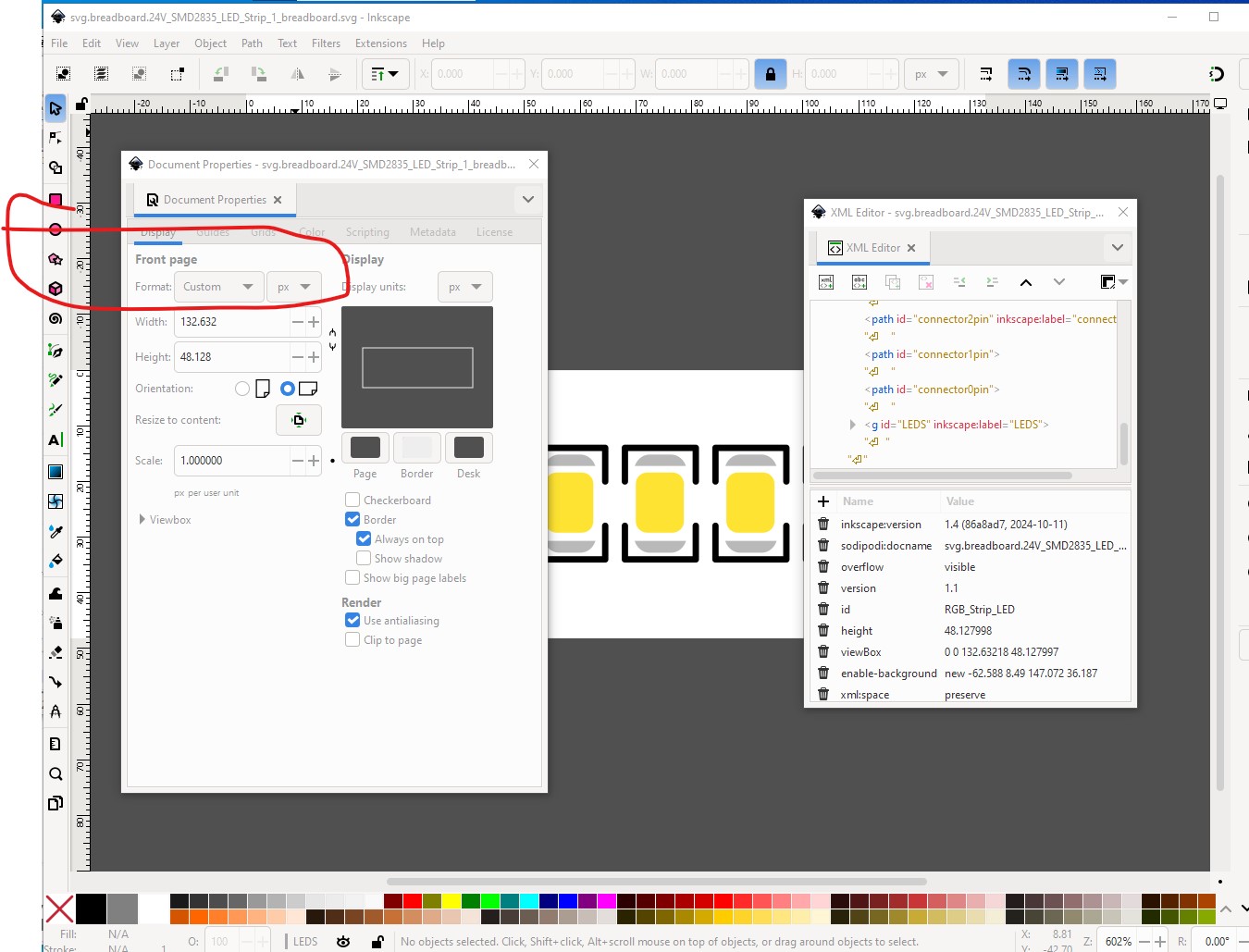
to this which will as noted probably make the scale wrong although if you were using a current version of Inkscape such as 1.4 it will likely be correct as the svg is at 96DPI and will scale correctly when changed to in.
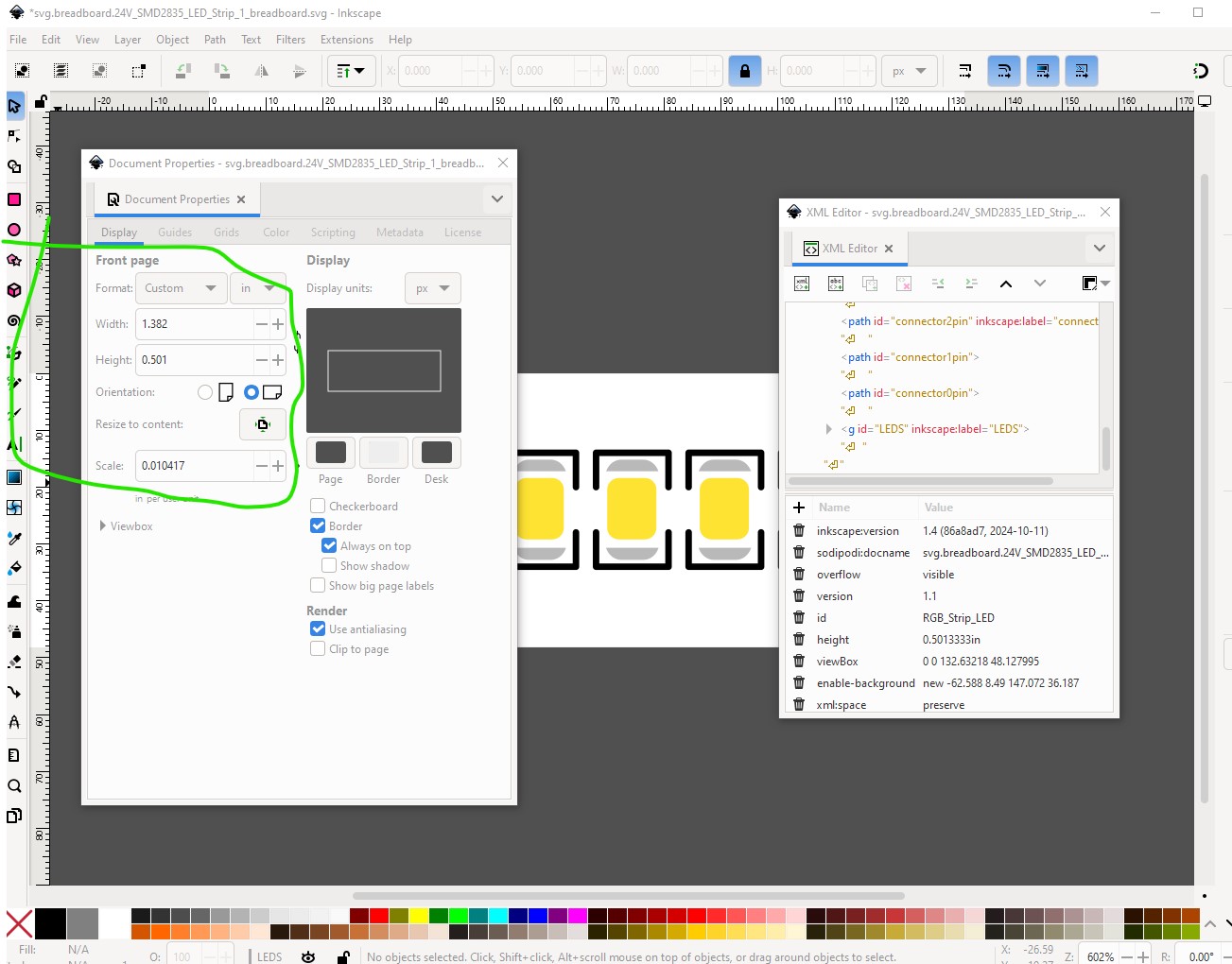
two other things of note, you want to put a rectangle filling the view box to mark the edge of the board of the LED strip (the viewbox won’t render an edge to the board although it will produce an outline of sorts. It is a better practice to specify the edge of the board with a rectangle. The other thing to do is to save the svg as plain svg rather than Inkscape format like this
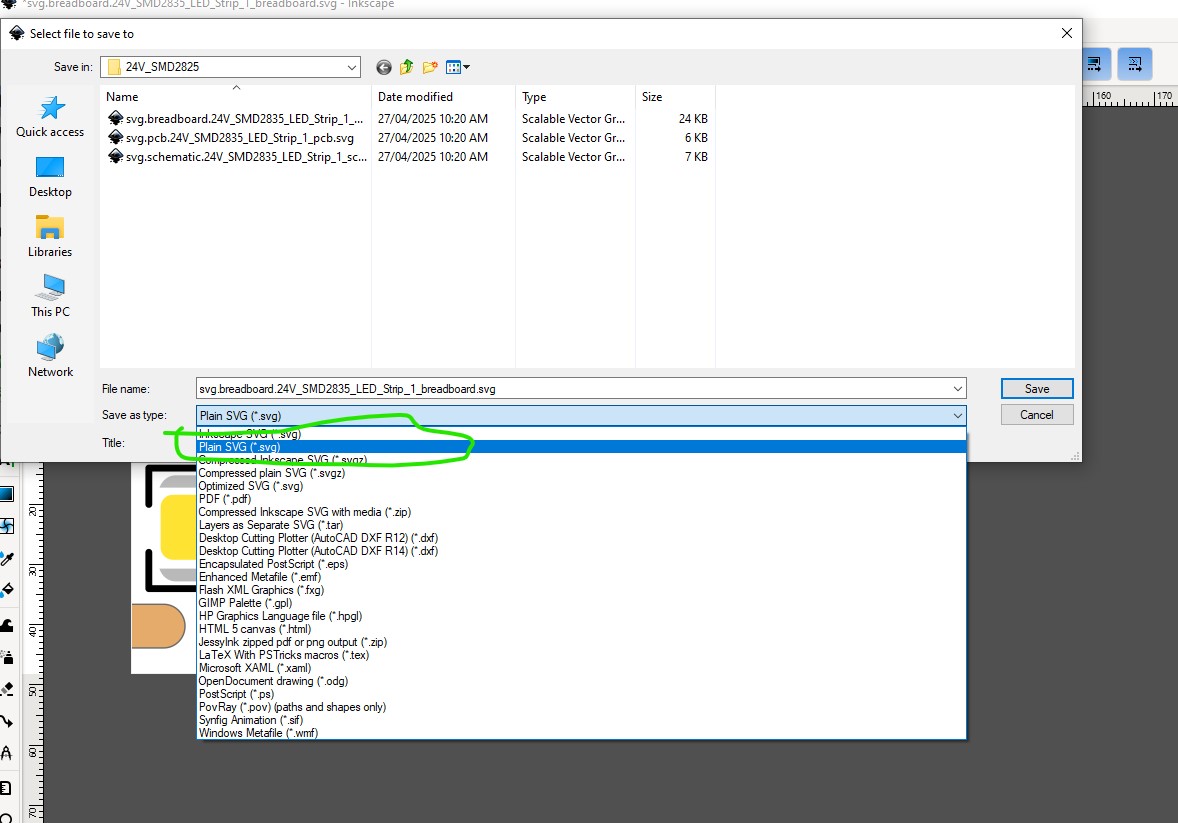
That eliminates the Inkscape specific additions which sometimes confuse Fritzing. With all that done this part
24V_SMD2825-fixed.fzpz (7.5 KB)
loads mostly correctly in Fritzing (here I am using Fritzing 1.0.5 which has a new error message!)
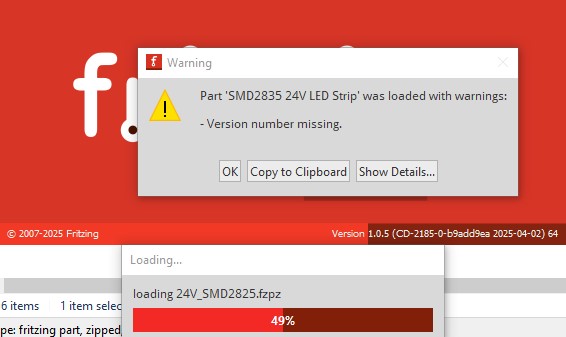
It appears the version number now wants to have something like 1.2.3 (or in this case probably 1.0.0) for version control (previous Fritzing versions would accept any version number!) Clicking OK to that loads the part (whcih may or may not be the correct size!)
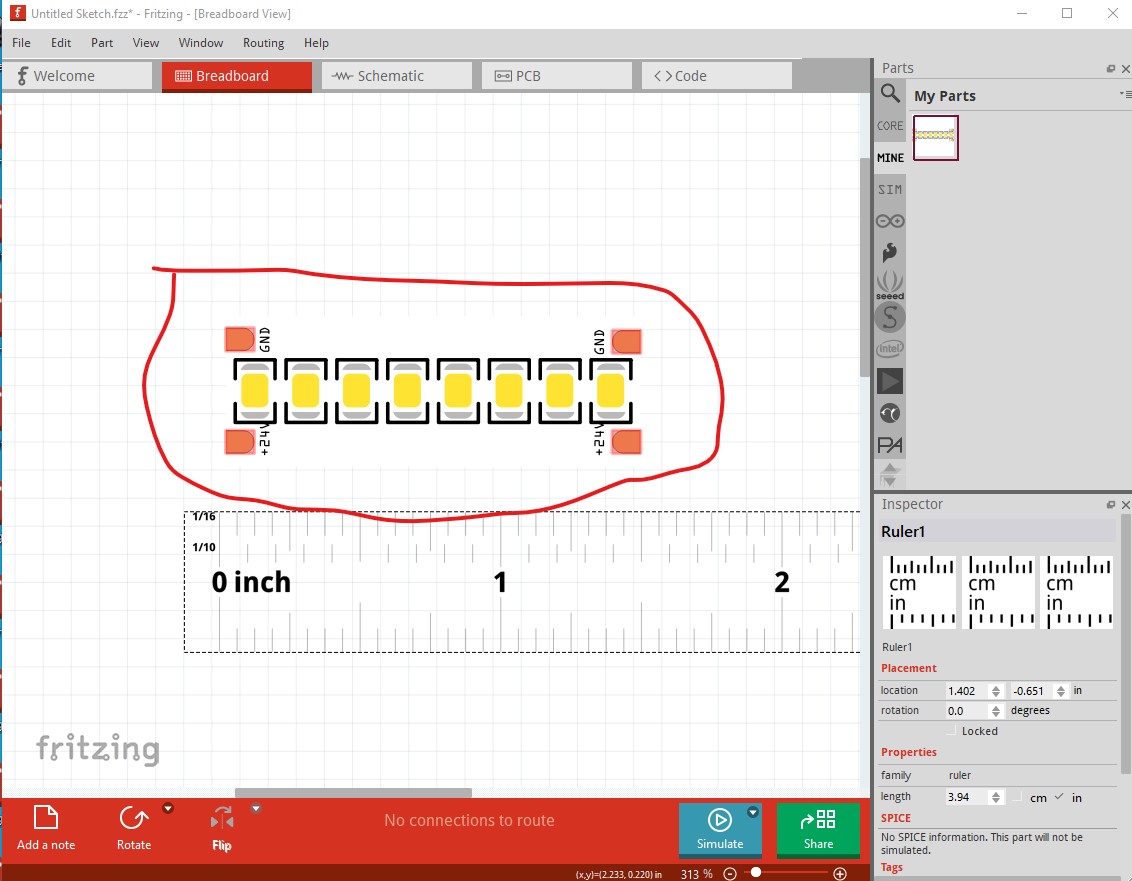
As noted it lacks a board outline and may be the wrong size if the scale isn’t correct (since I don’t know the size of the LED I don’t know how big it should be!) If you have the .fzpz file currently loaded in Fritzing you will need to delete it in the mine parts bin, and then shutdown and restart Fritzing (to actually delete the part, answer yes to keep parts and parts bin changes, no to save the sketch usually) as I didn’t change the moduleId and thus the part will be already loaded if you try and load the new one. If anything isn’t clear feel free to ask!
Peter