Thanks that is useful information. When I get the part creation backlog cleared I will report this as a bug and that helps isolate when it got added. Interestingly DRC doesn’t pick up the short which I think it should. It says the ground fill version with the short is ready for production which is alarming. I hope to get the parts finished today and get to bug reporting (I have several that bit me during this!)
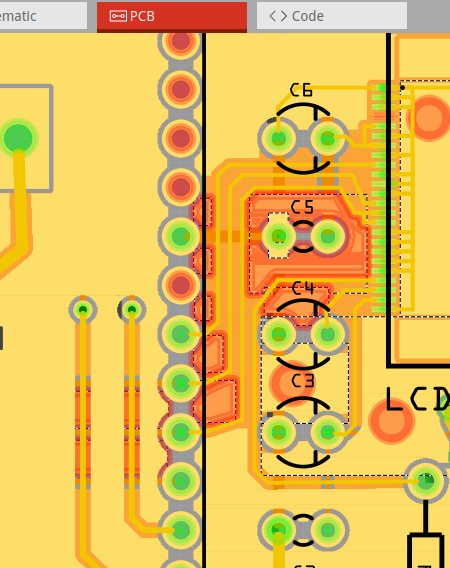
The odd/interesting bit is that the new ground fill completely ignores this via, it does not even recognise it as such.
It might be worth looking if a part connected to this track has the pin marked as GND.
But then again, it has not even treated it as a GND connected via (thermally separating it as on the other GND vias).
Ground fill adds a short across the power supply #4254
and I guess we will see what comes of it. When I get more time (assuming I get more time ) I will open a couple more, one on routing database corruption and one on moving pcb to the back changing the contrast on the silkscreen.
Good news! This wasn’t routing database corruption but rather my error. I was off by one on the connection so the rats nest line was in fact legitimate, not routing db corruption. There was supposed to be a connection where the rats nest line is, and shouldn’t have been a ground connection one pin up. The ground fill bug has been accepted as a bug so it will probably get fixed. We can successfully use ground fill on the board by falling back to 1.0.4 and using the old ground fill code which appears to work correctly until the 1.0.5 code is corrected (thanks to @real-bombinho for trying that!)
edit:
More good news, Kjell found the bug and the fix is scheduled for the 1.0.6 release.
Then the fun begins . Good luck (and be careful, adjust the power supply voltages without the electronics connected and make sure the power sequencer works correctly before adding the display as an error there is likely to damage the display.
Always check, because that will blow or at least weaken and cause early failure for most electronics (which are not as cheap as resistors!) Checking the power supply is the correct voltage before connecting any electronics is always a good habit to have.
haha yep , that happened to a bms board of mine on another project and it took me HOURSS to figure out the fault , i had managed to short 2 pins on the ic i think
 ) I will open a couple more, one on routing database corruption and one on moving pcb to the back changing the contrast on the silkscreen.
 . Good luck (and be careful, adjust the power supply voltages without the electronics connected and make sure the power sequencer works correctly before adding the display as an error there is likely to damage the display.