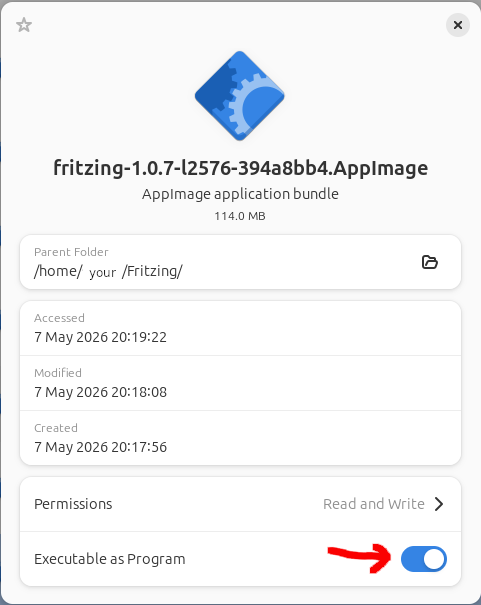
After downloading version 1.0.7 for Linux, no installing conform
chmod & ./ see I no icon for starting “Fritzing”
How to can I install version 1.0.7.
After downloading version 1.0.7 for Linux, no installing conform
chmod & ./ see I no icon for starting “Fritzing”
How to can I install version 1.0.7.
You have downloaded the appimage file and moved it into a suitable folder, e.g. a subfolder in Home?
You also have made the appimage file executable? You can check via right click [properties] and it should be enabled [Executable as program]?
If you double-click the appimage, it gets executed and you can open projects?
Where do you want your “icon”, on the desktop? If so, open your editor and create the following content:
[Desktop Entry]
Name=Fritzing 1.0.7
Exec=/[your folder]/fritzing-1.0.7-l2576-394a8bb4.AppImage
Type=Application
StartupNotify=true
Path=/[your folder]
Icon=/usr/share/icons/hicolor/512x512/apps/Fritzing.png
StartupWMClass=Fritzing
save it as .desktop file in your desktop folder
If you are missing the icon, you can use this (and copy it into the correct location):
Likely the icon is then greyed out and you have to right-click it and select [Allow Launching]
And @Sipdey-Westland, welcome to the Fritzing Forum
Thanx for the info, but that work it not good. In Linuxmint 22 works it good.
Which part did not work?
Looks like Dutch. The first message I interpret as that there is already an existing appimage.
Let’s try a step for step:
Open [Files]
click [Home]
find a folder named “Fritzing” (or similar)
if it does not exist, create it.
Copy your appimage file into this folder, it most likely is in [Downloads].
Once the appimage is in this folder, make it executable.
(same as chmod +x)
now you can doubleclick the appimage in your “Fritzing” folder and it should start Fritzing straight away.
Unless there is an Appimage Helper of some sort getting in the way this should work.
Hello,
can you please check if fuse2 is installed. Please enter the following command in the console:
sudo dpkg -l|grep fuse2
The following should then appear:
ii libfuse2t64:amd64 2.9.9-9 amd64 Filesystem in Userspace (library)
The important part is the two ii at the beginning, which means that the package is installed.
Regards, Harald!
Be careful to not mix up fuse and libfuse, they are different things.
The comand for ubuntu is directly on our download page:
https://fritzing.org/download
And linked from there are some details, if needed:
https://fritzing.org/download/linux-install
Specifically, the FUSE Wiki has this warning. Not sure if this is still valid for Ubuntu 25.04.
Warning: While
libfuse2is OK, do not install thefusepackage as of 22.04 or you may break your system. If the fuse package did break your system, you can recover as described here.
This is probably due to an outdated version of AppImageLauncer (v2 was released in 2020).
Related: AppImageLauncher support - #10 by FritSau
Tested with v3 from 2025 , which works.
v2 probably doesn’t support zstd yet (needs xz). The older xz is about 5 times slower during startup, which is relevant for the large number of files in Fritzing.
Hello,
why do I need to use AppImageLauncher? I haven’t installed it and integrated the AppImage manually. I’m running Debian 13 and Fritzing 1.07. It works perfectly.
Best regards, Harald!
You don’t need to, but if it works, it’s nice.
Basically, it unifies the AppImage “installation” procedure. However, the v2 release is from 2020, and the v3 release (which seems to work fine) is still in beta.
I posted about it because I think it is the culprit for the problems @Sipdey-Westland is facing.
See above link to the repo for details.
Wouldn’t it then be possible to include a small script? The script would then carry out the steps I did manually.
x-fritzing.xml)fritzing.desktop LauncherI also had to link the icons to the Adwaita theme and reload the gtk-update-icon-cache.
Do distributions really differ that much?
That would definitely be closer to the system and you wouldn’t be dependent on the AppImage Launcher.
Regards, Harald!