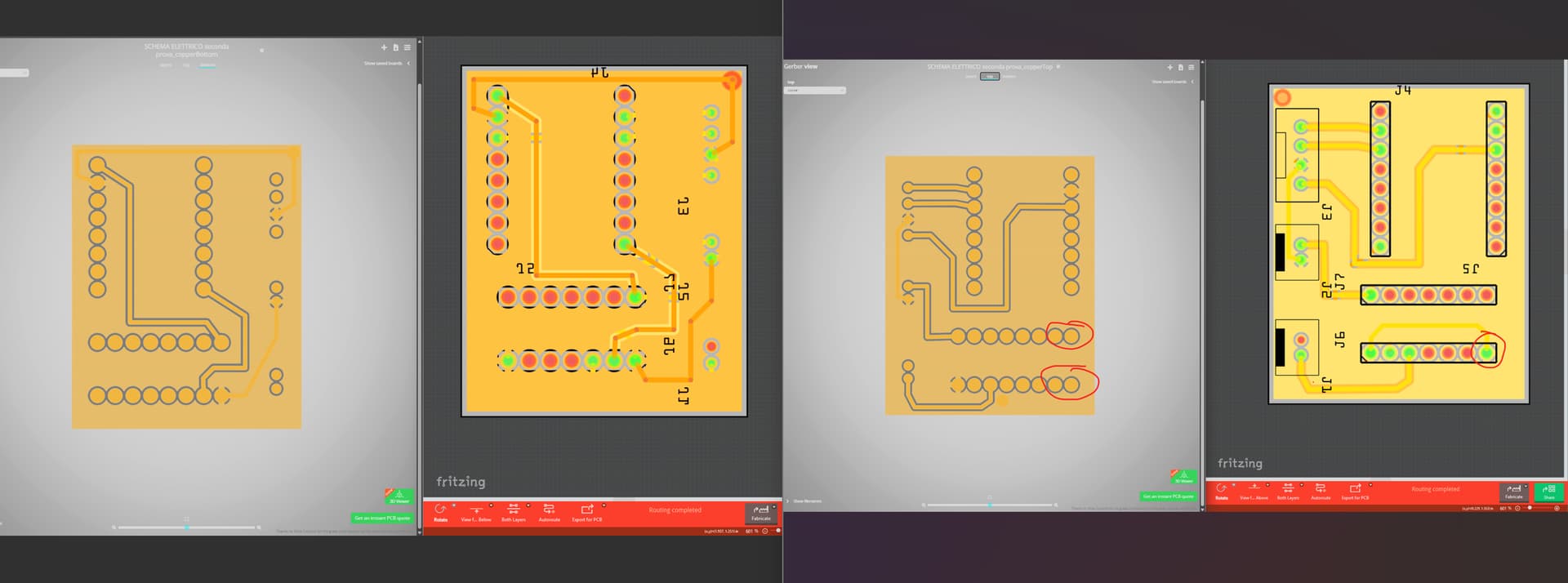
I created a very simple pcb and followed 3 steps to fabricate the pcb with PCBWay:
- I clicked the Fabricate button and selected PCBWay
- Once finished uploading the files, I clicked Open in browser
- The software opened the browser to the PCBWay page with the gerber files already attached
All I had left to do was place the order, simple.But…
The PCB is not correct, I contacted PCBway who responded immediately, attaching the Gerber files they received (from Fritzing) and yes, they were right, the Gerber files did NOT reflect at all what I had on the screen. Look at the images, how is this possible? By exporting the files using the appropriate export function File → Export → for Production → Extended Gerber (RS-274X)… the files are correct.
Look at the pictures, on the left you can see the Gerber, guys there are 8 holes on the bottom connector and also the ground connection of one pin is missing. How is this possible?