Tried to upload a variety of different .fzpz parts files. Instead of loading it, I got the error message as follows:
Unable to open sharable part [path to the part file]: zip.open() -1000
…
What I expected should have happened instead:
It should have imported the part. I tried deleting all files and trying again, but the same thing happened.
…
My version of Fritzing and my operating system:
Fritzing 1.0.6
MacOS 15.7.5
…
Please also attach any files that help explaining this problem
That message is fairly explicit. Can’t open file at that path. What is the path? Is a network drive maybe? Next is that opening a part file saves the content to an internal parts folder. I do not know where that is on mac. Next, how was Fritzing installed? Mac outside my experience, but on other environments problems have been seen in some combinations.
Yes, it can’t open the file at that path. I’m not sure why. I’ve tried selecting “Open” and navigating to the file, I’ve tried going to the tool list, selecting “Mine” and selecting “import” from the “hamburger” in the upper right, I’ve tried dragging the file into Fritzing. They all end the same way. I’ve tried this with some additional .fzpz files, all of them react the same way. I’ve tried uninstalling and re-installing. Nothing seems to work. A number of articles - in this forum and online - talk about accessing the .configure directory. Unless I’m missing something, it seems this version of the MacOS (15.7.5) does not have that file structure. So what is this bug or what am I missing?
You did not answer the other questions. Have you tried to import files from a different folder? If the path is not ‘local’, there can be problems. If that path is a samba share for example. Being able to ‘see’ and ‘copy’ a file is not always enough to be able to ‘open’ it. A fzpz file is technically a zip file. Opening a zip means needing to be able to create a temporary file, maybe folder. Where that happens depends on details I do not know about your system.
The original message said “zip.open() - 1000”. The 1000 is probably your user id. 1000 is normal id for a single user system. zip.open is failing. can you open (unpack) zip files? Fritzing probably tries to use the operating system to do the unzip. If that fails, so does Fritzing open.
A web search for “fritzing config mac“ turned a post on this forum with:
Yes, I’ve tried different folders. I tried “downloads” and “desktop”, which are very usual places to have it located from. (I can’t show you the error message, as I’m apparently only allowed one attachment…)
I’ve never had an issue with any file of any kind, including Zip files, when located in major folders like Downloads, Desktop, and Documents. There absolutely should not be any kind of permissions issue with files located in these locations. If there is, then it’s totally a bug.
Config is not anywhere in the Documents > Fritzing directory.
Lastly, I’m seeing this about the MacOS that I’m using:
Yes, macOS 15.7.5 (Sequoia) supports a ~/.config directory, but it is not created by default by the operating system.
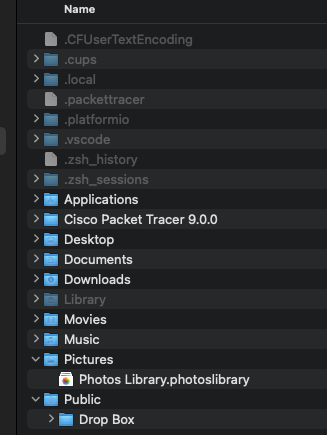
Here is a screenshot of my home directory, including hidden files:
Since I have not been seeing a bunch of other similar complaints, I suspect the problem is specific to something on your machine. MacOS is outside my area, so can’t really help further. I do see that no “.config” folder is shown on your list. My understanding is that Fritzing should create that either during install, or on first run.
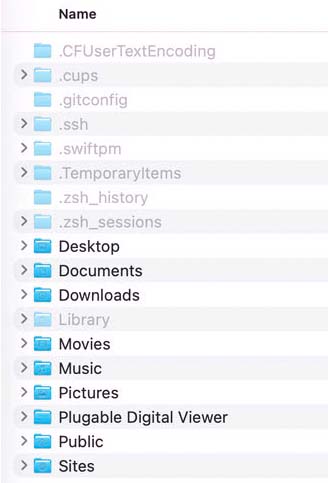
I’ve just run Fritzing 1.0.6 up on macOS 15.7.3. I can’t see a ~/.config/Fritzing directory either but .fzpz files seem to load OK. Is there any other info I can provide that might help?
EDIT: Have you tried to load a part running Fritzing under another user account? The Guest User or some other ‘clean’ user install?
It may well be that my situation is unique. However I don’t think so because I have a standard MacBook and am running the most recent MacOS. I’ve tried to delete the app and re-install it several times. The result is the same each time.
I’m also using a standard MacBook. You really need to check how things work under a user where there’s no real chance that the environment has been modified. The Guest User is a good option, because it’s generally ‘brand new’ each time you log in. If you just reinstall Fritzing under the current user, you won’t necessarily be fixing the problem if it’s ‘outside’ of the immediate Fritzing environment.
EDIT: I’ve just updated the MacBook to macOS 15.7.5 and it’s still loading new parts as it should. Now, my MacBook is an older, Intel model, but I have an M1 running Sonoma (14.8.1) and an M4 running Tahoe (26.3) and they’re also both fine with Fritzing 1.0.6. You really need to try running Fritzing under another, preferably ‘untouched’, user account…
UPDATE:
I noticed that the Fritzing app said it’s been tested on the latest MacOS: Tahoe 26.4. I’ve updated to that version of the OS and deleted the app. After re-installing again, I’m seeing the same thing as before. There is not a .Config directory and I get the same error as before when I try to load a new part. So updating the OS did not appear to do anything - it behaves as before.
I am unable to add a Guest account because my laptop is owned by our school district and that’s been turned off.
To: UniquePete
I included a screenshot of my top level directory structure, including hidden files. Are you able to do a similar screenshot? If it includes the .Config file in the screenshot, it would help me figure this out with our IT department.
Thanks,
– Markus
Another Update: I think the answer to this might be that older .fzpz files may not work. I went to the Forum and found a section called something like “approved custom parts”. I downloaded a couple parts and was able to import them. I went back to the older parts and was still not able to import them.
So I think this post can be closed. But before I do that, if anyone has a link to newer Adafruit parts, that would be great. (Most of the ones in Git Hub are between 2 and 15 years old.) The part I’m specifically looking for is the INA219 so I can use the Arduino to read how much power the other parts are using.
It would help to post or link the parts in question.
We will try to improve future Fritzing releases, so the parts would produce a more specific error message. It should be clear what is broken and why the fzpz can’t be loaded.